
Username
Your personal sign-in name. It is case-sensitive: type it exactly as written, capitals included.
Setup
IPTV Ireland setup comes down to three things once the login message is on your phone: a player app on the screen, three details typed into it, and a guide that agrees with the clock on the wall. This page walks through it screen by screen, then covers the guide on Irish time, catch-up, picture settings, and what to change on full fibre, fixed wireless or a 4G router.
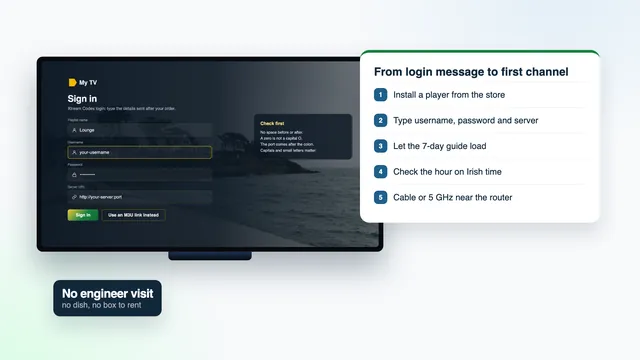
Before you start
Most setups go wrong at the typing stage, not the technical one. Sit where you can read the message and see the TV at the same time, with the remote in your hand and the phone unlocked.
Know which device you are setting up. A smart TV, a Fire TV stick, an Android box and an Apple TV each take a different player, and the store you install from depends on it. The model name is usually in the device’s Settings, under About.
Sign in to the device’s app store before you begin: Google Play on Android TV, the App Store on Apple TV, Amazon’s store on Fire TV. A forgotten store password stops an IPTV Ireland setup more often than anything on our side.
Finally, note the time. If you start in the evening, the speed you measure is the speed you will get when it matters.
Step by step
Run a speed check in the evening on the device that will play the channels, not on your phone. About 5 Mb/s holds HD, 10 Mb/s Full HD and 25 Mb/s one 4K picture, and the figure needs to stay steady.
Where a cable can reach the router, use one. Where it can’t, connect to the 5 GHz band of your Wi-Fi (its network name often ends in 5G) and keep the device close to the router.
Google Play on Android TV and Google TV, the App Store on Apple TV, iPhone and iPad, the TV’s own store on Samsung and LG. On a Fire TV stick, the link to fetch the player comes inside your login message, and Downloader installs it.
In the player, choose the sign-in type called Xtream Codes (some apps say « Xtream API ») rather than the playlist option. Name the profile after the room the TV is in, or anything you like.
Copy each detail from your message in turn. Capitals count, a stray space breaks the sign-in, and the server address keeps the http:// at the start and the port digits at the end.
The first load brings in the channel groups, the films, the series and seven days of listings. It can take a minute or two on a slower line; leave the remote alone until it finishes.
Pick any programme in the guide and set its start time against your phone’s clock. Ireland is on GMT at the moment. If every listing sits an hour early or late, move the EPG time offset one hour in the right direction.
Start with a channel from the Irish groups at the top of the list. If your line and TV can take it, open a title marked 4K in the films menu and let it run for a few minutes.
Mark the channels you watch most as favourites, hide the world groups you will never open, and set the player’s parental PIN if children use the TV. The next evening, the player opens straight on what you watch.
Two TVs on Atlantic 12 Duo? Repeat steps 2 to 8 on the second screen with the same details. On the single-screen plans the player can sit on several devices, but only one plays at a time.
Your details
The message arrives on WhatsApp or by email about 2 minutes after payment. It holds two ways into the same channels: the three Xtream Codes details, and an M3U playlist link with its guide link. You only need one of the two on each screen.
Copy and paste where you can. On a phone, a long press on a detail selects it; on a TV, type slowly and check each character before moving on. Nothing in the message changes during the plan, so a screenshot of it is a sensible backup.
Keep the message to yourself. It is the key to your household’s access, and details posted publicly or passed around outside the home may be suspended.
Your login message, about 2 minutes after payment
Placeholders only: your real details are sent to you and to nobody else.
Your personal sign-in name. It is case-sensitive: type it exactly as written, capitals included.
Goes with the username. If a player rejects it, copy it again rather than retyping from memory; a missing character is the usual cause.
Where the player goes to fetch everything: http://, a host name, a colon, then a port number. The placeholder http://your-server:port shows its shape; yours is in the message.
The entire channel list packed into a single web address. Players built around playlists take it: Kodi, VLC and Smart IPTV, for instance.
The programme-guide feed, in XMLTV format. With Xtream it comes in automatically; playlist users sometimes have to paste it into a field of its own.
When access stops. It is fixed from day one and never extended automatically.
Players
IPTV Smarters Pro is missing from Amazon’s Appstore, so Downloader brings it in. First go to Settings › My Fire TV › Developer options and switch « Install unknown apps » on for Downloader. No Developer options entry? Under Settings › My Fire TV › About, press the stick’s name seven times to reveal it. TiviMate works here too. A few recent Amazon models use Vega OS, which accepts Appstore apps only, so check the model before relying on one.
TVs and boxes with Google Play take IPTV Smarters Pro or TiviMate straight from the store. Stay with store versions: unknown APK files passed around forums can carry malware.
Smarters Pro shows up in some of these TVs’ stores and not others, by model and by country. Smart IPTV is activated once for each TV; you then send the playlist from the app’s website against the TV’s MAC address. IBO Player works the same way, keyed to that address or its own device key. Or plug a stick into a spare HDMI port.
Get IPTV Smarters Pro from Apple’s App Store. On the Apple TV itself, Settings › Video and Audio › Match Content holds two switches worth turning on, « Match Dynamic Range » and « Match Frame Rate », so HDR and sport play as the source intended.
On a computer, VLC (free) plays the M3U link and makes a quick check that the playlist works. Macs with Apple silicon also run Smarters Pro.
A certified Android TV box behaves like an Android TV and gets the same players. Kodi reads the playlist through an add-on called « PVR IPTV Simple Client », set up with the M3U link and the guide link.
Downloading most players costs nothing; Smarters Pro sells an optional upgrade inside the app, priced differently by store. Copycat apps are around: the genuine one lists Tech Smarters Private Limited as its developer. None of these apps, sticks or boxes come from us. The player opens the login, and the login is what brings the channels.
For more depth on one device, read the Fire TV stick guide for Irish homes, the comparison of IPTV apps in Ireland or what to look for in an IPTV box. Whatever the device, the IPTV Ireland setup on it ends with the same three details.
Sign-in
| Xtream Codes (three details) | Playlist (M3U link) | |
|---|---|---|
| To enter | Three short fields | A single long link |
| Listings | Arrive on their own | Usually need the EPG link too |
| Films and series | Separate menus with artwork | Up to the player; may be one long list |
| Catch-up | Marked on archive channels | Only if the player handles it |
| Players that suit it | TiviMate, IPTV Smarters Pro, XP IPTV, IBO Player | Kodi, Smart IPTV, VLC |
| When to use it | Daily viewing on a TV or stick | No Xtream option, or a quick look on a laptop |
Both come from the same plan and show the same channels. Use the Xtream sign-in wherever the player offers it: three short fields are far easier to enter with a remote than a long link, and the guide, the films and the series arrive with it.
Keep the M3U link for players that take nothing else. The M3U guide shows where to paste it in each of them, and where the guide link goes.
Irish time
The seven-day guide is set to Irish time: Greenwich Mean Time (GMT) in winter, and Irish Standard Time (IST), one hour ahead, between the final Sunday in March and the final Sunday in October. Ireland keeps the same clock as the UK, so a home in Northern Ireland sees the same hours, with BST written where the Republic says IST.
On 6 November 2026 Ireland is on GMT. The clocks next go forward on 28 March 2027, to IST, and back again on 31 October 2027, to GMT. A player that takes its time from the device moves by itself on those nights.
If the guide shows programmes an hour early or late after a change, check the device first: its time zone should be Ireland or Dublin, with automatic time switched on. Only if that is right and the guide is still out should you nudge the EPG time offset, one hour forward or back.
One trap: in Irish players, IST stands for Irish Standard Time. India time is 5 h 30 ahead of Irish winter time and 4 h 30 ahead in summer; the guide to Indian channels in Ireland explains how to read those listings.
| Period | Clock in the Republic | Clock in Northern Ireland | Against UTC |
|---|---|---|---|
| Until 28 March 2027 | GMT | GMT | UTC+0 |
| 28 March 2027 to 31 October 2027 | IST | BST | UTC+1 |
| From 31 October 2027 | GMT | GMT | UTC+0 |
Catch-up
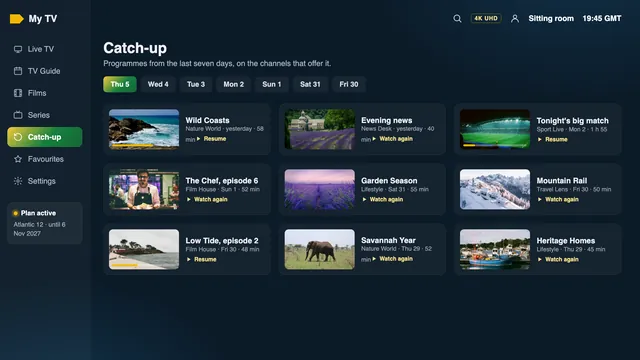
Channels that keep an archive carry a small clock or rewind mark in the channel list or the guide. On those, you can usually go back up to seven days. Open the guide, move left past the current hour to the day you want, pick the programme, and it starts from the beginning.
Catch-up depends on each channel: if no mark shows, the channel keeps no archive and nothing earlier can be played. With the Xtream sign-in most players show catch-up by themselves; with the M3U link, it depends on what the player supports.
It earns its keep on a weekday evening: a Gaelic football match that threw in while you were still on the road home, or a programme that clashed with homework. Live streams themselves run a few seconds to about thirty seconds behind the broadcast, so a neighbour’s cheer may reach you first.
Picture
| Setting | Where to find it | What to choose |
|---|---|---|
| Output resolution | The device’s display settings | 4K (2160p) on a 4K TV, on an HDMI 2.0 port or later |
| Dynamic range and frame rate | Apple TV’s Match Content menu | Both switches on, range and frame rate |
| Video decoder | The player’s settings, often under Player or Playback | Hardware decoding, so the device decodes HEVC (H.265) itself |
| HDR | Automatic | Shows when the title carries it and your player and TV can handle it |
| Sound | The device’s and the player’s audio settings | Dolby Atmos appears if the programme carries it and the TV or soundbar decodes it |
| Motion smoothing | The TV’s own picture menu | Off or low for sport; sources that allow it run at 50 frames per second |
If a 4K title stutters while HD plays fine, the cause is nearly always the decoder or the line rather than the plan. Switch the decoder to hardware, move the stick to the HDMI port marked for 4K, and take the speed again on the device.
Not every channel is 4K. Pictures reach 4K UHD only on channels and titles made in 4K; the rest is HD or Full HD, and the badge in the guide tells you which before you press play.
Connection
| Your line | Usual evening speed | One plan plays | First thing to try |
|---|---|---|---|
| Full fibre to the home | 100 Mb/s and up | 4K on two TVs | Wire the main TV to the router; Wi-Fi in a far room often slows before the line does |
| Fibre to the cabinet | 30–70 Mb/s | 4K on one TV | Speed falls with the distance from the cabinet; keep 4K for one TV and use Full HD versions elsewhere |
| Fixed wireless | 15–30 Mb/s | Full HD | Needs a clear line of sight to the mast; speed dips with distance and weather, so pick Full HD versions |
| 4G or 5G router | 10–40 Mb/s | HD to Full HD | Place the router high and near a window facing the mast, or fit an outdoor antenna |
A cable beats any wireless link. If the TV is near the router, a plain Ethernet cable removes most evening trouble before it starts. If it is not, keep to the 5 GHz band with the router and the TV sharing a room, or put a mesh point or powerline adapter with a wired port beside the TV. The 2.4 GHz band reaches further but slows down when the neighbours are online.
Evenings from about 19:00 to 23:00 are when Irish lines are most crowded, weekends and big-match nights most of all, so a speed reading at lunchtime flatters the line. Measure on the device itself, at the hour you watch.
There is usually room for 4K on two TVs. The weak link tends to be inside the house: an old router in a press under the stairs, or a stick behind a wall-mounted TV. Wire the main screen and the rest sorts itself out.
Speed falls the further the house is from the green cabinet down the road, and evenings take a bite out of it. One TV in 4K is realistic; a second TV playing at once does better on the Full HD version of a channel.
The antenna on the house needs a clear line of sight to the mast, and wind, rain and distance all move the speed. Full HD is the safe choice. If the picture drops on wild evenings, ask your broadband company to check the antenna’s alignment.
Signal strength and how busy the mast is in the evening decide everything. Put the router high up, by the window that faces the mast, and consider an outdoor or window-mounted antenna. HD to Full HD is what to expect; keep downloads and phone updates off while the match is on.
Higher delay and, on some offers, data limits make it a poor fit for live streams. If it is your only option, ask the team before ordering.
Every line type is set out in more detail in the Irish broadband guide. An IPTV Ireland setup on a slow line is not a lost cause; it is a matter of choosing the right version of each channel.
First evening
Run these on the first evening, at the hour you normally watch, rather than straight after installing. A setup that behaves at four in the afternoon can still struggle at nine.
Tell us what you saw. A one-line message such as « sitting room, Fire TV, Full HD fine, 4K pauses » gets a faster, more useful answer than « it’s not working », and a photo of the screen beats both.
If everything on the list passes, your IPTV Ireland setup is done. The only date left to note is the end date in your message: for Atlantic 12 paid on 6 November 2026, that is 6 November 2027.
Fixes
| Symptom | Usual reason | Fix |
|---|---|---|
| Login refused (« invalid » or « authorisation failed ») | A typo, a capital letter or a space in one of the three details | Copy each detail again from the message; check the server address keeps http:// and its port |
| Channels but no programme guide | The guide has not loaded yet, or an M3U sign-in without the EPG link | Refresh the EPG in the player’s settings, or paste the EPG link |
| Guide one hour out | The device’s time zone, or a clock change | Set the device to Irish time with automatic time on; then use the EPG time offset if needed |
| Pauses every few minutes in the evening | Wi-Fi on 2.4 GHz, a busy line or a weak 4G signal | Ethernet or 5 GHz; the Full HD version of the channel; take the speed on the device |
| 4K title black, choppy or silent | No hardware HEVC decoding, a non-4K HDMI port, or a sound format the TV cannot take | Hardware decoder on, an HDMI 2.0 port, audio set to stereo or auto |
| A second TV stops the first | A single-screen plan playing on two TVs at once | Watch on one at a time, or choose Atlantic 12 Duo at your next order |
| The Fire TV will not install the player | « Install unknown apps » not allowed for Downloader, or a Vega OS model | Allow it under Developer options; on a Vega OS stick, use another device |
| The login stopped after months of working | The end date has passed | Order again, then type the new details into the app you already have |
Still stuck after the table? Tell the team which device and player, how far you got, and attach a picture of the screen. Most fixes take one or two messages.
FAQ
On a TV or stick where the player is already installed, typing the three details and waiting for the lists takes a few minutes. Allow longer on a Fire TV, where the player goes in through Downloader. Each extra screen takes about as long as the first.
Usually not. Most smart TVs, streaming sticks, phones and tablets take a player app. A stick or box only helps when the TV has no suitable player, and it adds nothing to the channels: the login is what brings them.
Yes, install a player on each and type the same details. On a single-screen plan only one of them plays at any moment; Atlantic 12 Duo lets two play together.
The device is probably on the wrong time zone or has automatic time switched off. Set it to Ireland or Dublin first; if listings still sit an hour off, shift the offset setting for the EPG inside the player.
Paste the M3U link from your message into the playlist field. If there is a separate EPG or guide field, paste the EPG link there so the listings appear next to the channels.
The same three details go into every player in the house. If you have not ordered yet, the plans page sets out the months, the screens and the cost per day, all paid once in euro with nothing that renews.